
Your AI can write the email.
Can it finish the job?
The next test for business AI is what happens after the answer: connected systems, clear limits and a result you can verify.
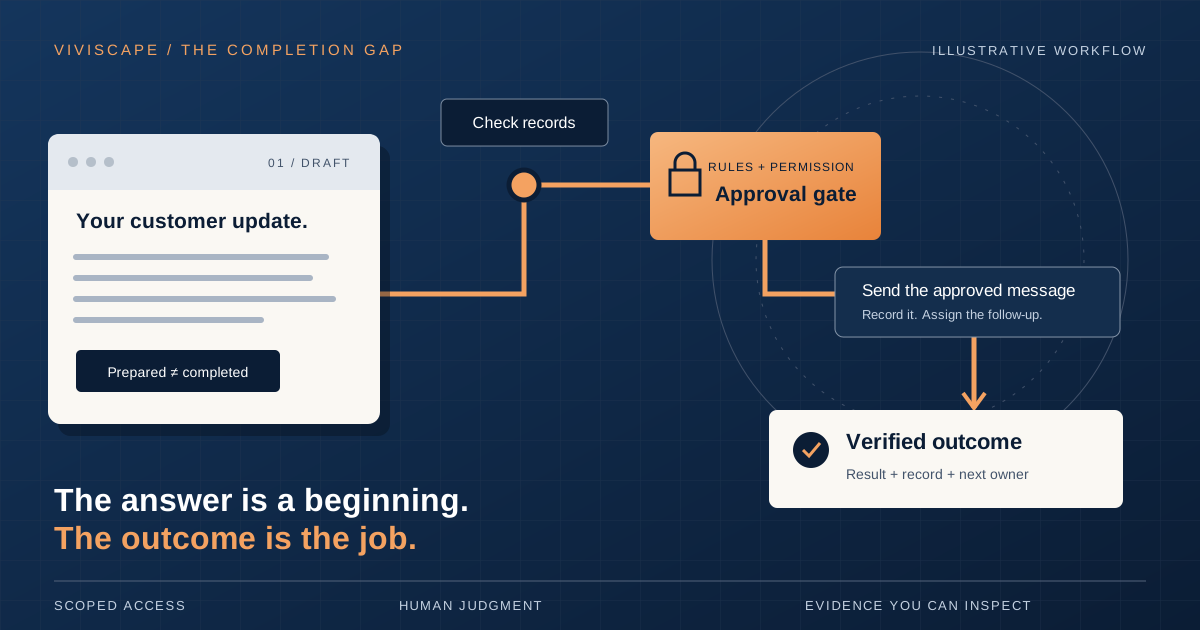
An AI writes a polished customer follow-up in seconds. Then someone checks the account, finds the right contact, corrects the details, sends the message, updates the record, creates a task and remembers to check back.
The writing got faster. Look at everything still sitting on that person’s desk.
That is where the next useful conversation about business AI starts: with the work surrounding the answer. Who moves it forward? What are they allowed to change? How does anyone know it actually happened?
For leaders looking at agents, those questions belong near the beginning of the buying decision.
Follow the work past the draft
Consider a hypothetical service company. A customer emails about an unfinished job and asks for an update.
A drafting assistant can help write a response. To finish the workflow, someone still needs to identify the job, check the latest technician notes, confirm the next step and decide what the customer can reasonably be told.
A connected agent could be configured to handle more of that sequence. It could retrieve the relevant records, prepare the response, request approval where required, send the approved message and record the follow-up against the job.
Each step depends on actual access, reliable data and explicit permission. If the technician’s notes conflict with the schedule, the agent should bring that conflict to the person responsible. It should not turn uncertainty into a confident delivery promise.
The opportunity becomes clearer when you map the whole sequence. The draft is one step. The business needs the request handled, the record current and the next action owned.
A worked example / hypothetical
Follow the job.
Not just the message.
A customer asks for a service update. This is a workflow design example, not a claim about a live ViviScape feature or a customer result.
- 01Draft
Ground the answer
Check the permitted job records. Prepare an update using confirmed details. Flag missing information.
Output: a sourced draft - 02Approve
Make the decision visible
Show the recipient, message and intended record changes. A responsible person approves this action.
Gate: explicit approval - 03Act
Use scoped access
Send the approved message through the authorized tool. Save the job note and assign the follow-up.
Boundary: only this task - 04Verify
Check what changed
Inspect the send result and read back the record. Report completed steps and anything still unresolved.
Evidence: receipts + record
One important distinction: a tool accepting a send request does not prove that a customer received or read the message. The completion report must say exactly what was verified.
The operating boundary
Keep the business rules in the business
A conversational interface makes it easier to ask for work. Someone can say, “Prepare an update on this job,” without remembering which screen holds each detail.
That flexibility needs a dependable foundation.
ViviScape Work’s role is to hold operational context, coordinate work and keep the record of actions and approvals. Your existing accounting, customer and operational systems can remain authoritative for the information they own. The agent becomes a flexible way to work across those systems. Learn about ViviScape Work.
Keep the separation clear: business rules and permissions should be enforced by the systems performing the action. A differently worded request must not become a way around a spending limit, an approval requirement or access restrictions.
The conversation helps someone express an intention. The underlying records and controls determine what can happen.
Give the agent a job description
“Handle customer service” leaves too much undefined. A useful first assignment is smaller and easier to inspect.
For our hypothetical service company, the boundaries might look like this:
- Read job records and customer correspondence for assigned accounts.
- Draft factual updates using confirmed information.
- Send only within an explicitly approved communication policy.
- Route refunds, disputed charges and new delivery commitments to a named person.
- Record what happened and identify the owner of the next step.
That is a starting specification, not a claim about an out-of-the-box product feature. The integrations, permissions and approval behavior need to be checked in the actual implementation.
Also decide what happens when nobody approves. Does the request stay pending? Who sees it? When does it escalate? An approval queue without an owner can become another place for work to disappear.
Give the workflow a small contract
- Read
- Which source is authoritative, and which records are in scope?
- Act
- What may change, and what must stay outside the task?
- Approve
- Who can authorize the action, and what will they review?
- Prove
- What evidence will count as completion?
Define “done” before you automate
An agent saying “done” is a report. You still need evidence from the system where the action was supposed to happen.
For the service update, completion might require a sent-message record, a saved job note and a follow-up task assigned to the right person. A saved draft does not meet that definition. A message accepted for sending also does not prove the customer read it.
Partial completion deserves its own status. If the email sends but the job note fails to save, the workflow should show both facts. Retrying the entire sequence could send the customer a duplicate message.
Build for that ordinary messiness. Check which steps succeeded, retry only where appropriate and give a person enough context to resolve the exception. Keep the original request, relevant approvals and resulting record references together.
This is where a useful demonstration becomes a workable business process.
Design the second attempt
“Almost done” needs
its own workflow.
A connection times out. Approval arrives after the source changes. The email sends, but the record update fails. These are design cases, not footnotes.
Check before retrying.
If the send result is uncertain, inspect the tool’s status or transaction reference. Do not send a second message just because the first response was lost.
Revisit the approval.
If the recipient, message or relevant source facts change, return the revised action for review.
Preserve the truth.
Report “message sent; record update unresolved.” Keep the evidence, name an owner and resume only the unfinished step.
Start with a workflow you can measure
Choose a frequent, well-understood process with a clear owner and manageable consequences if something goes wrong. Write down how it works today, including the awkward handoffs people have learned to work around.
Then test the connected workflow against ordinary cases and exceptions. Missing information, conflicting records, unavailable systems and revoked access all deserve a place in the test.
Start with review before consequential actions. Expand permission only after the results justify it. Give the process owner a practical way to pause execution and take over.
Measure the full cost: time spent doing the work, reviewing it, correcting mistakes and managing exceptions. Track completion time and unresolved requests alongside hours saved. Otherwise, a faster first step can hide a larger cleanup job.
Some work will continue to require a qualified professional or an authorized decision-maker. An agent can gather information and prepare material for review; connecting it to more tools does not give it professional qualifications or permission to make every decision.
Define “done” before you automate.
Find the work worth handing over
The Manual Work Tax shows up in the retyping, checking, chasing and coordination that keeps a process moving. Reducing it starts with seeing where people are carrying those steps today.
Pick one workflow. Follow it from request to verified outcome. Identify the rules, the permissions and the moments that deserve human judgment. Then decide which steps an agent can responsibly take on.
That gives you a concrete test for the next AI investment: can it finish the agreed job, within its limits, with evidence you can inspect?
Find the work hiding in the handoffs
What is your
Manual Work Tax?
Start with an estimate of the manual effort in your operation. Use it to choose a workflow worth examining—not as a promise of savings.