
No mockups, no marketing renders. Five screens from a live shop — what your service writers, technicians, and parts people see every day.
Most service shops do not lose money on the wrench work. They lose it in the gap between the bay and the invoice — the hour a technician never wrote down, the part pulled off the shelf that nobody billed, the customer who called three times because no one could say where their unit stood.
That gap is filled by people. Someone retypes an email into a work order. Someone deciphers a handwritten time sheet at the end of the week. Someone reconciles parts against a spreadsheet. None of it is billable, and all of it is where accuracy goes to die.
Service Center closes the gap. Requests become work orders automatically. Technicians speak their time instead of writing it. Parts consumed on a job land on the invoice. The shop floor and the front office see the same truth, at the same moment.
Everything a service operation runs on, sharing one set of data. No exports, no re-entry, no second version of the truth.
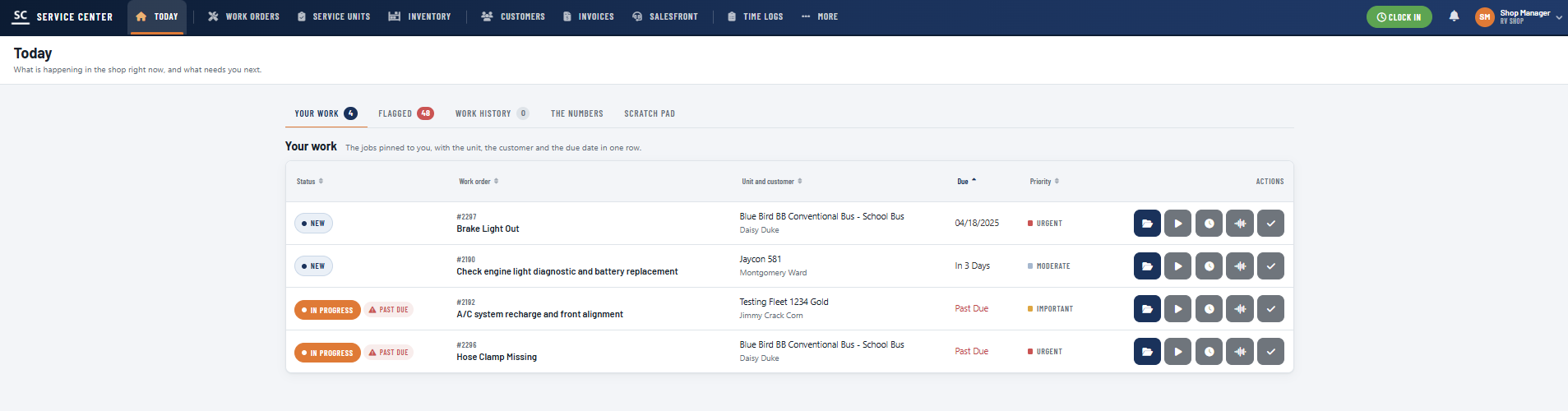
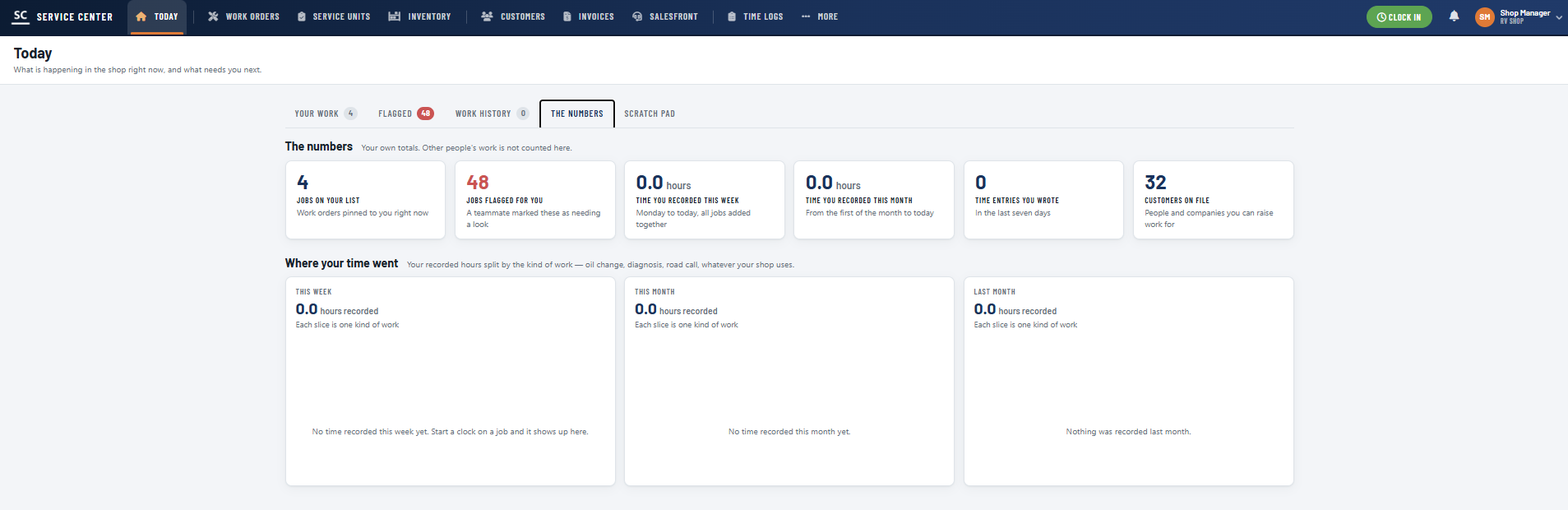
The shop-floor home screen. What is happening right now and what needs you next — your pinned jobs, work flagged by a teammate, recent history, your recorded hours, and a scratch pad. One glance replaces the morning huddle.
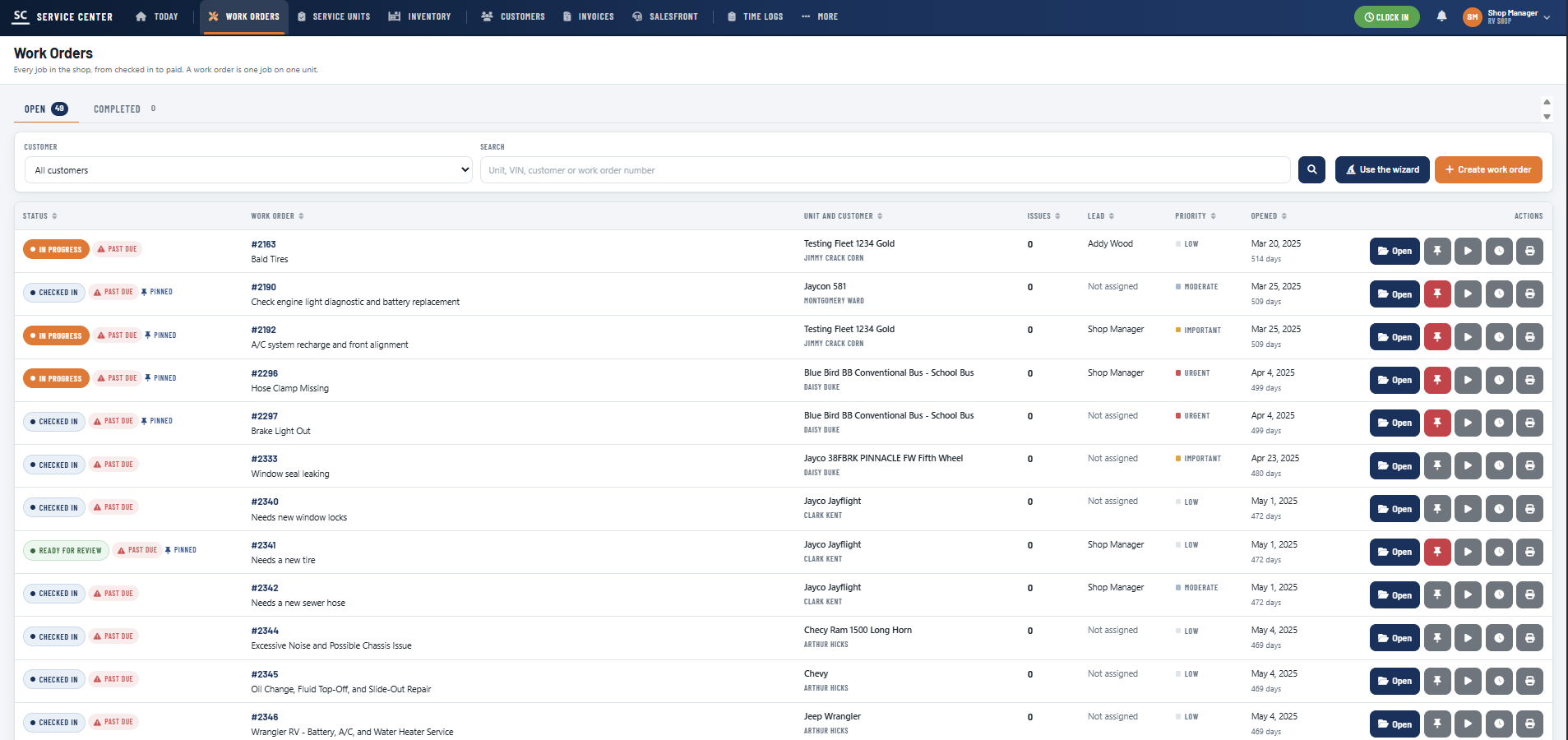
One job on one unit, tracked from checked in to paid. Status, priority, lead technician, days open, and past-due flags on every row. Build one from scratch or let the wizard walk a service writer through it in under a minute.
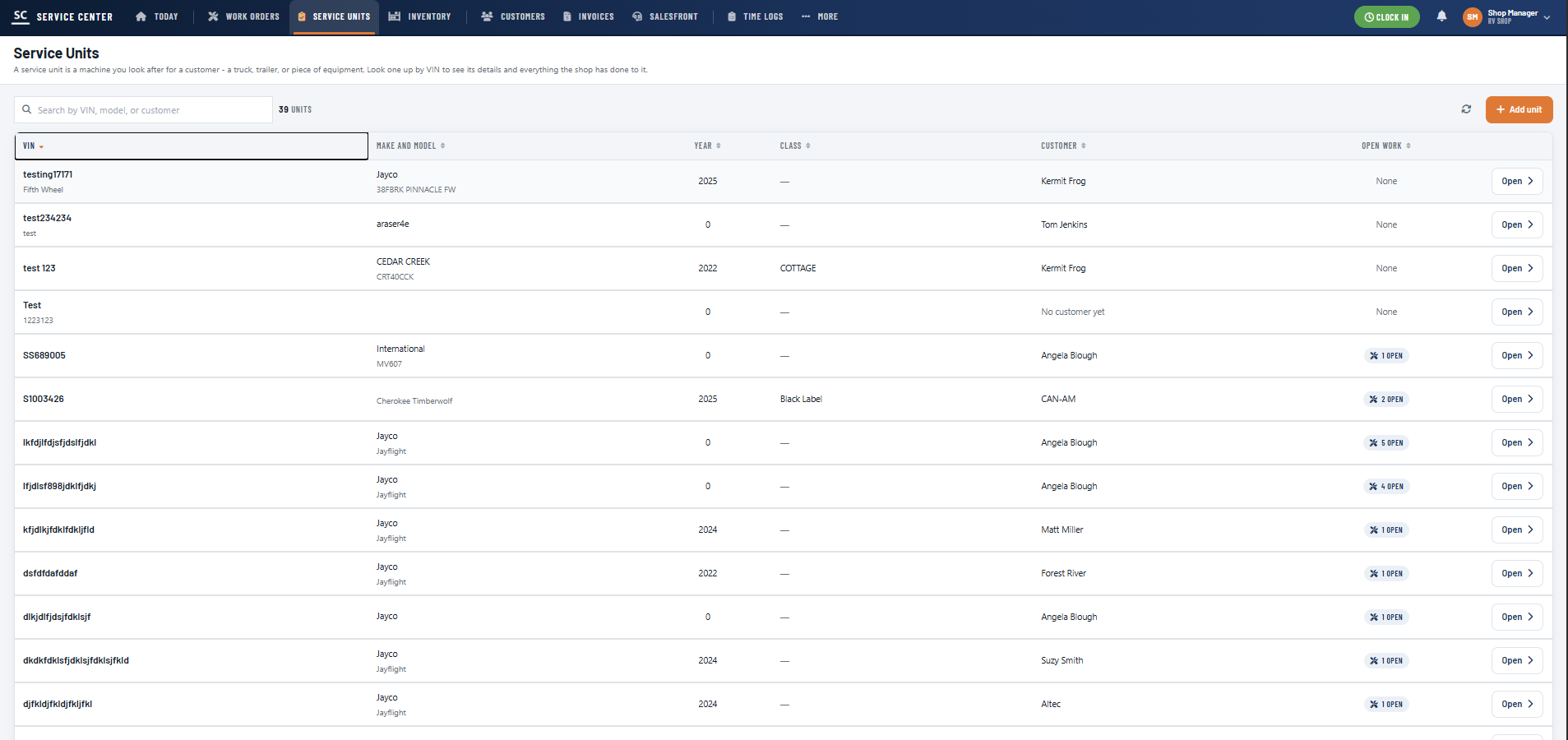
Every machine you look after for a customer — coach, fifth wheel, trailer, truck, bus, or equipment. Search by VIN to pull up specs, ownership, open work, and the full repair history your shop has performed on that unit.
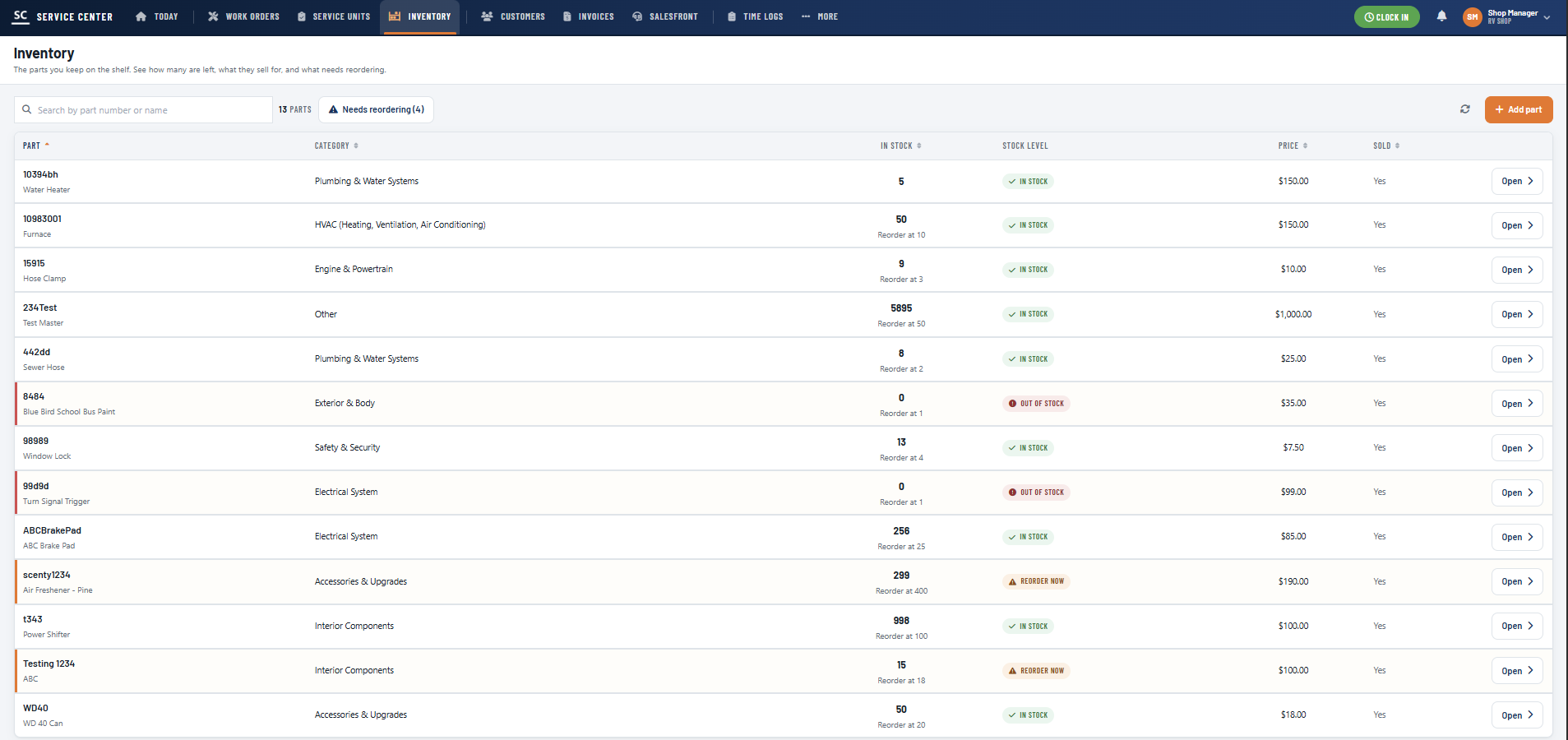
Parts on the shelf with quantity on hand, category, price, and a reorder point per part. Stock levels flag themselves — in stock, reorder now, out of stock — so a job never stalls on a part nobody knew was gone.
People and companies you raise work for, with their units, their history, and their open jobs attached. A service advisor answers "where is my rig" from one screen instead of three phone calls.
Billing built from the work, not retyped from it. Labor logged by technicians and parts consumed on the job flow straight onto the invoice, so what you bill matches what you actually did.
The counter side of the shop. Sell parts, accessories, and services over the counter against the same inventory and customer records your service work runs on — one ledger, not two.
Clock in, clock out, and every entry attached to a work order and a kind of work. Payroll and job costing read from the same log, so your effective labor rate stops being a guess.
By email, by a shared intake link, or through a form embedded on your own website. However it arrives, it lands in one queue instead of three inboxes and a notepad.
New customer? Service Center creates one. Existing customer or unit? It links them. A detailed work order is drafted automatically — before anyone touches a keyboard.
With talk-to-text, a technician says what they did and what they used. AI turns it into a structured entry on the right work order — hands stay on the unit, not on a clipboard.
Accurate time, parts, and service data, already attached to the job. The invoice assembles itself from work that actually happened — same day, not next week.
AI in Service Center is not a chatbot bolted onto a sidebar. It is pointed at the exact work that keeps service writers off the phone and technicians off their tools: reading requests, matching records, and turning spoken words into billable line items.
That is the part of a shop's day that is pure overhead. It produces no repairs and delights no customers, but it consumes hours every week and quietly decides how accurate your billing is. ViviScape calls that the Manual Work Tax — and this is where a service operation pays the most of it.
Every AI action lands as a normal record a human can see, correct, and sign off on. Nothing gets invoiced that your team cannot inspect first.
An inbound email or form becomes a structured work order with the customer, unit, and complaint already filled in.
Technicians describe the repair out loud; AI writes the labor, parts, and notes onto the right job.
Repeat customers and known VINs are linked to existing records instead of spawning duplicates.
Logged time and consumed parts are gathered into a billable invoice for a human to review and send.
Service Center started in RV shops, built alongside RV technicians and owners rather than adapted from generic contractor software. The same model fits any operation that turns labor and parts into invoices.
Warranty and customer-pay work on coaches, fifth wheels, and travel trailers, with unit history that survives technician turnover.
Log the call from the driveway. Talk-to-text and mobile time entry mean the paperwork is finished before the van leaves.
Dozens of units under one owner, each with its own open work, its own history, and its own cost per mile of service.
Anything with a VIN or a serial number, a customer attached, and parts that need to make it onto the bill.
We used to lose hours every week tracking down work orders and chasing parts updates. Service Center put everything in one place — now my techs stay on the floor and our billing is dead accurate.
We did not guess at this. Service Center was built with working technicians and shop owners — speed, simplicity, and zero double entry, specified by the people who live in the bay.
Bring in one bay, a handful of units, and your real jobs. Two weeks is enough to see whether the paperwork gap closes.
Every hour you wait is one you do not get back.
Plan pricing scales with seats and is quoted to your shop size. Talk to us and we will size it to your operation.
RV Shop Manager is now Service Center. Same platform, same team, broader scope. The product outgrew RV-only work — shops brought in trailers, trucks, buses, fleets, and equipment — so the name changed to match what it actually manages.
Existing accounts, data, units, and logins carry over unchanged. Nothing to migrate.
Any service or repair operation that turns labor and parts into invoices:
If a unit comes in, gets worked on, and generates a bill, the model fits.
No. Technicians use talk-to-text — they say what they did and what they used, and AI turns it into a structured time log with labor, parts, and notes attached to the correct work order.
Typing still works for anyone who prefers it, and every entry is editable before it hits an invoice.
Three ways, all of which end in the same queue:
AI reads the request, matches or creates the customer and the service unit, and drafts the work order before anyone touches a keyboard.
A service unit is the machine you look after for a customer — a coach, a fifth wheel, a trailer, a truck, a bus, or a piece of equipment.
Each unit has its own record: VIN, make, model, year, class, owner, open work, and the complete history of everything your shop has done to it. Look one up by VIN and the whole story is there, whether or not the technician who did the work is still with you.
Yes. Parts are tracked by part number with quantity on hand, category, sell price, and a reorder point. Stock levels flag themselves as in stock, reorder now, or out of stock, so you find out before a job stalls.
Parts consumed on a work order flow onto the invoice rather than quietly leaving the shelf unbilled — which is where most shops lose parts margin.
Start with a 14-day free trial: all features unlocked, 5 users included, no setup fees, cancel anytime.
After that, plan pricing scales with seats and is quoted based on shop size and how many bays and technicians you are running. Contact us and we will size it to your operation rather than sell you a tier you do not need.
Yes. Service Center is built and maintained by ViviScape, a custom software company — the platform is ours, so it can be extended with the workflows, integrations, and reports a specific operation needs.
If your shop has a process that no off-the-shelf product respects, that is a conversation we can actually have. See how we build custom software.
Work orders, service units, parts, time, and invoices in one system — with AI handling the intake and the data entry your team never wanted to do.
No setup fees · 5 users included · Cancel anytime
Service Center is a ViviScape product, engineered in Elkhart, Indiana — the middle of the RV industry. If your operation needs more than a product can give it, we build the system around how you actually work.
Service Center is built on ViviScape Work — the same agent and orchestration layer that runs our AI workforce, with the same human approvals and audit history underneath it.