
Your business depends on people being able to access email, customer information, financial systems, and everyday applications. When someone steals an employee’s sign-in credentials, those same connections can become a route into the organization.
Stronger passwords help, but they still leave employees with a secret that can be stolen or entered into a convincing fake login page. FIDO2 changes how that access is protected. It gives businesses a practical path to phishing-resistant authentication while making everyday sign-in simpler.
What FIDO2 actually does
FIDO2 is a set of open authentication standards built around public-key cryptography. Its two core components are WebAuthn, which connects websites with authentication capabilities in browsers and platforms, and CTAP2, which lets external authenticators, such as security keys, communicate with those platforms. FIDO Alliance explains the standards.
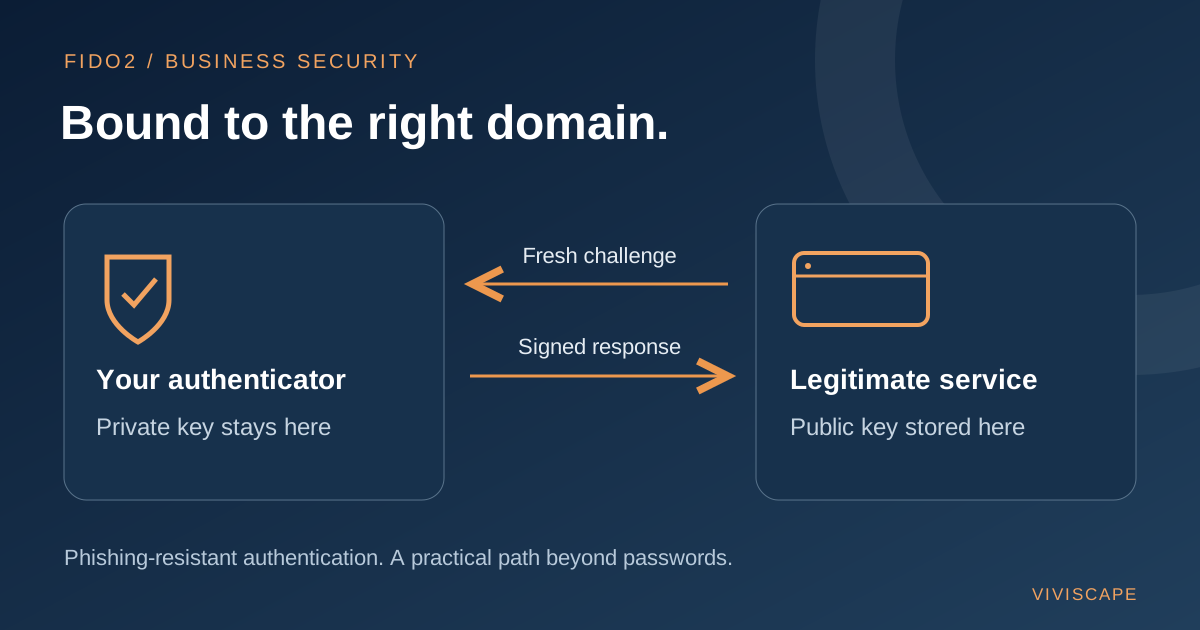
Instead of proving your identity by sending a reusable password, you use a cryptographic credential. The service stores a public key. Your authenticator uses the corresponding private key to sign a fresh challenge, and the service checks that signature with the public key. The private key is not sent to the website during sign-in. Microsoft’s FIDO2 overview describes this process.
For the employee, the experience can be straightforward: use a security key, fingerprint, face recognition, or a local PIN to authorize sign-in. With biometric or PIN verification, possession of the authenticator and local verification can provide multiple authentication factors without a password.
Why ordinary MFA can still fall short
Multifactor authentication remains an important improvement over passwords alone. However, different MFA methods offer different protection.
An attacker can trick someone into typing a text-message or authenticator-app code into a fake website. Traditional approve-or-deny push notifications can also expose employees to repeated prompts until they approve one. Number matching helps address push fatigue, but it does not make the method phishing-resistant. CISA’s MFA guidance distinguishes these protections.
FIDO2 credentials are bound to the legitimate service’s domain, and the browser checks the website’s origin. A convincing copy hosted on an attacker’s domain cannot use that credential to authenticate to the real service. This is the foundation of FIDO2’s phishing resistance. FIDO Alliance’s enterprise guidance explains the domain-bound challenge-response model.
That matters because employees should not have to detect every deceptive login page perfectly. Authentication can enforce a protection that awareness training alone cannot provide.
How passkeys fit into the picture
Passkeys are FIDO credentials used for passwordless sign-in. They can be stored in different ways:
- Device-bound passkeys stay on one authenticator, such as a hardware security key or supported device.
- Synced passkeys can be made available across a user’s devices through a passkey provider.
Both can provide phishing-resistant authentication. Their differences matter for device control, recovery, and organizational policy. A business may prefer device-bound credentials for privileged accounts while allowing approved synced passkeys for other employees.
Biometrics remain local to the authenticator. The website does not receive the employee’s fingerprint, facial scan, or local PIN. Biometrics are optional; a supported PIN-based method can provide an alternative. FIDO Alliance’s passkey guidance covers these distinctions.
A practical rollout for your business
A successful deployment starts with the applications and people you need to protect, rather than a companywide switch flipped overnight.
- Identify your priority accounts. Start by assessing administrator access, email, finance, and systems containing sensitive business information. Confirm which applications, browsers, and devices support your chosen methods.
- Pilot with a small group. Include IT staff and employees with different working arrangements. Test shared workstations, mobile access, remote work, and accessibility needs before expanding.
- Decide which authenticators to allow. Consider security requirements, device ownership, replacement costs, and whether employees can use phones at work. Make the choice practical for each role.
- Prepare enrollment and recovery. Verify identity before issuing or replacing credentials. Where appropriate, register a backup authenticator. Document what happens when a key is lost, a phone is replaced, or someone leaves the organization.
- Enforce stronger sign-in gradually. Allowing passkeys and requiring phishing-resistant access are separate decisions. Review weaker fallback methods, monitor sign-in results, and expand after the pilot works reliably.
For organizations using Microsoft 365, Microsoft Entra ID provides a route to enable passkeys for selected groups. Conditional Access authentication strengths can require phishing-resistant methods for protected resources. Check current licensing, platform support, and policy requirements before deployment, and test emergency access separately. See Microsoft’s passkey deployment guidance and authentication strengths documentation.
Protect the account beyond the login
FIDO2 strengthens authentication, but account recovery and alternate sign-in paths still need protection. A strong primary method provides less value if an attacker can bypass it through a weak reset process. Lost security keys need a tested replacement process, and synced passkeys require attention to the provider account’s security and recovery controls. FIDO Alliance’s recovery guidance addresses these considerations.
Devices and active sessions also matter. Malware on a compromised endpoint may steal session tokens after a legitimate sign-in. Continue patching, endpoint protection, access controls, and monitoring alongside phishing-resistant authentication. Microsoft’s token protection guidance explains why a layered approach remains necessary.
Take the next step
FIDO2 offers a meaningful way to reduce exposure to stolen passwords and deceptive sign-in pages. Start with your highest-risk access, choose methods your employees can use consistently, and build recovery into the plan from the beginning.
Ready to consider stronger authentication for your business? Start a conversation with ViviScape.